> For the complete documentation index, see [llms.txt](https://docs.optitrack.com/llms.txt). Markdown versions of documentation pages are available by appending `.md` to page URLs; this page is available as [Markdown](https://docs.optitrack.com/v3.2/movement-sciences/prime-color-camera-setup/prime-color-camera-setup-faq-troubleshooting.md).
# Prime Color Camera Setup: FAQ / Troubleshooting
Q: Can custom camera lenses be used?
A: The Prime Color camera uses the standard C mount for the lens, and lenses from other vendors can be mounted onto the color camera; however, there will be no guarantee for the lens and image quality. For this reason, we suggest using lenses that we provide.
Q: Slow memory write out
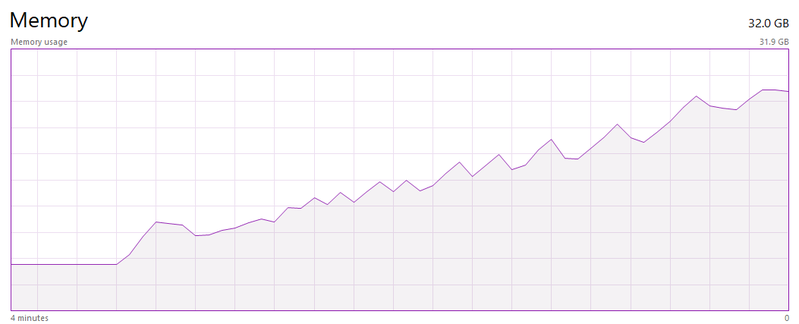
A: If the disk drive on the host PC is not fast enough to write the data, the RAM usage will gradually creep up to its maximum memory when recording a capture. In which case, the recorded TAK file may be corrupted or incomplete. If you are seeing this issue, you will have to lower down the [bit-rate](/v3.2/movement-sciences/prime-color-camera-setup/prime-color-camera-setup-camera-settings.md#bit-rate) to reduce the amount of data or use a faster disk drive.
Q: There are frame drops even when there is enough bandwidth available
A: Dropped 2D frames with Prime Color in the system can be introduced due to the following issue:
* **Low PC Specifications or improper settings:** If you're seeing a significant amount of frame drops your PC specifications or settings may need to be upgraded and fine tuned. For the latest PC specifications and settings, please see our [Quick Start Guide: Prime Color Camera Setup](/v3.2/quick-start-guides/quick-start-guide-prime-color-camera-setup.md) page.
* **Network Bandwidth:** Insufficient network bandwidth will cause frame drops. You will have to make sure the network setup, including the network switches, Ethernet cables, and the network adapter on the host PC, is capable of transmitting and receiving data fast enough. See:[ Data Bandwidth](/v3.2/movement-sciences/prime-color-camera-setup/prime-color-setup-hardware-setup.md#data-bandwidth)
* **Audio playing in background (MMCSS):** When playing audio using applications (e.g. Chrome, VLC) that registers to Multimedia Class Scheduler Service (MMCSS), it will interfere with how the CPU resource is used in Motive. This service will prioritize time-sensitive multimedia applications to utilize the CPU resources as much as possible, which may cause increased latency which may lead to dropped frames. We recommend exiting out from such applications if there are any latency and frame drop issues. It is best to [remove any unnecessary apps and bloatware](/v3.2/quick-start-guides/quick-start-guide-prime-color-camera-setup.md#debloat-windows) to limit the competition of resources for Motive.
---
# Agent Instructions
This documentation is published with GitBook. GitBook is the documentation platform designed so that both humans and AI agents can read, navigate, and reason over technical content effectively. Learn more at gitbook.com.
## Querying This Documentation
If you need additional information that is not directly available in this page, you can query the documentation by asking a question.
Perform an HTTP GET request on the following URL with the `ask` and `goal` query parameters:
```
GET https://docs.optitrack.com/v3.2/movement-sciences/prime-color-camera-setup/prime-color-camera-setup-faq-troubleshooting.md?ask=&goal=
```
`ask` is the immediate question: it should be specific, self-contained, and written in natural language.
`goal` is what the user is ultimately trying to achieve, the reason they need the answer. Sharing it helps GitBook give you a better, more relevant answer. A goal is most helpful when it describes the outcome the user wants rather than restating the question. For example, with `ask=how do I create an API token`, a goal like `automate deployments from our CI pipeline` lets GitBook tailor the answer to that use case.
The response will contain a direct answer to the question and relevant excerpts and sources from the documentation.
Use this mechanism when the answer is not explicitly present in the current page, you need clarification or additional context, or you want to retrieve related documentation sections.